Comparison
eSIM vs Pocket Wi-Fi vs Roaming vs Local SIM: Which Travel Data Option Wins?

Compare the four ways to get mobile data abroad by cost, setup and trade-offs, plus how to check eSIM support and avoid common setup mistakes.
Published · Updated
The four options at a glance
There are four common ways to stay connected abroad: a travel eSIM, a rented pocket Wi-Fi device, your home carrier's roaming plan, or a physical local SIM bought at your destination. None is best for everyone. The right choice depends on how many people are travelling, how long you stay, your phone model, and whether you need to receive texts on your home number.
For solo travellers and couples on short trips, a travel eSIM is often the easiest option today. If your phone doesn't support eSIM, or a whole family wants to share one connection, another option may suit you better.
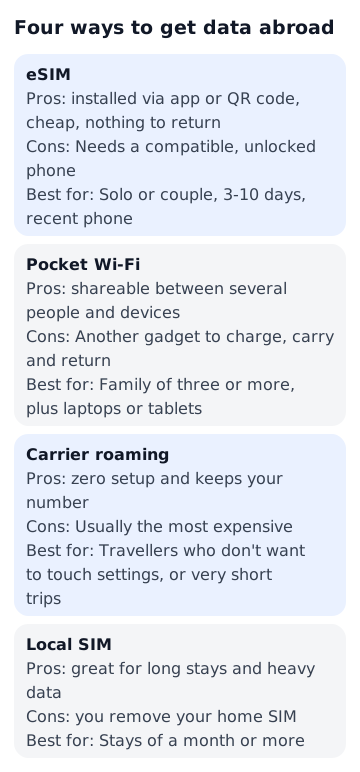
- eSIM: installed via app or QR code, cheap, nothing to return. Needs a compatible, unlocked phone
- Pocket Wi-Fi: shareable between several people and devices. Another gadget to charge, carry and return
- Carrier roaming: zero setup and keeps your number. Usually the most expensive
- Local SIM: great for long stays and heavy data. Gives you a local number, but you remove your home SIM
What each option roughly costs
Prices vary widely by destination, data allowance and seller, so check the exact price on the seller's official page before you buy. For a short solo trip an eSIM is usually the lighter option, and regional plans covering many European countries often cost somewhat more than single-country plans.
Pocket Wi-Fi is usually charged per day, so the cost grows with the length of your trip. Split between three or four people, though, the per-person cost can match or beat an eSIM. Check the rental fee, deposit and delivery charges on the provider's official page.
Carrier roaming comes as day passes or multi-day plans and is usually the most expensive option for a solo traveller over several days. Check the rates on your carrier's official website. Local SIM prices vary a lot by country, and airport kiosks and carrier stores in town may charge differently, so compare before you buy.
How to check if your phone supports eSIM
iPhones from the XS and XR onward support eSIM, and many recent Google Pixel, Samsung Galaxy and other flagship Android phones do too. Budget models and some region-specific versions may not, so don't rely on the model name alone.
The quickest check is on the phone itself. On an iPhone, go to Settings > General > About and look for an EID entry. On Android, look for an 'Add eSIM' or 'Download a SIM' option under the SIM or network settings. Dialling *#06# on many phones will also show an EID if eSIM is supported.
Your phone must also be carrier-unlocked. Phones bought on a contract or financing plan are sometimes locked to one network. If in doubt, ask your carrier before you travel.
Installing an eSIM before departure
Installing an eSIM requires an internet connection, so do it at home on reliable Wi-Fi rather than at the arrival gate. With most plans the validity period starts when the eSIM first connects to a network at your destination, but some start as soon as they're installed, so read the activation terms before you buy.

- 1. Buy two or three days before departure and add the eSIM via QR code or the provider's app
- 2. Rename the line (for example 'Travel') so you don't mix up lines
- 3. Keep the eSIM line switched off until you land
- 4. On arrival, switch the eSIM line on and set it as the line for cellular data
- 5. Turn on data roaming for the eSIM line (most travel eSIMs require it)
- 6. Turn off data roaming on your home SIM to avoid unexpected charges
Five common eSIM mistakes
Most 'my eSIM doesn't work' problems come down to settings rather than coverage. Check these before contacting support.
- Data roaming is off on the eSIM line. Travel eSIMs usually connect as roaming, so it must be on
- Cellular data is still assigned to your home SIM, which can trigger roaming charges
- 'Allow cellular data switching' is enabled, letting the phone fall back to your home line when the eSIM signal is weak
- iMessage and FaceTime switch to the new line. Check they still use your home number
- Deleting the eSIM mid-trip. Many can't be reinstalled, so only remove it once you're home
Keeping your home number for texts and codes
A big advantage of eSIM is that your home SIM can stay in the phone. If you leave the home line on with data roaming off, you can usually still receive SMS such as bank verification codes and card alerts. Incoming texts are free with many carriers, but confirm your carrier's policy before you go.
Messaging apps work over data, so the eSIM covers them. A physical local SIM, by contrast, usually means removing your home SIM, which can lock you out of text-based verification during the trip. If you do swap SIMs, keep your home SIM and the ejector pin somewhere safe.
Which option fits your trip
Match the option to your travel style rather than chasing the cheapest price per gigabyte.
- Solo or couple, 3-10 days, recent phone: eSIM
- Family of three or more, plus laptops or tablets: pocket Wi-Fi
- Travellers who don't want to touch settings, or very short trips: carrier roaming
- Stays of a month or more, or you need a local number for apps and bookings: local SIM
- Want a safety net: use an eSIM as your main data and know your carrier's roaming day pass as a backup
Services mentioned in this article
Affiliate links. You book on each company’s official site — OneWorld never takes payment.
FAQ
Can I make phone calls with a travel eSIM?
Most travel eSIMs are data-only. Use internet calling apps, or call from your home line and accept your carrier's roaming call rates.
When does the eSIM validity period start?
It depends on the plan. Many start on first connection at your destination, but some start at installation, so check the activation terms before buying.
Won't turning on data roaming cost me money?
Data roaming is set per line. Turn it on for the eSIM and off for your home SIM, and you'll only use the eSIM's data.
How long does a pocket Wi-Fi battery last?
It varies by device, but a full day of heavy use is often a stretch. Carry a power bank, and remember everyone loses data if the group splits up.
Related reading


ⓘ Photo credits
- Small island on a coral reef, Maldives · Dr. Ondřej Havelka (cestovatel) / CC BY-SA 4.0
- Jungfraujoch (Top of Europe) · Rosser1954 / CC BY-SA 4.0
- Gandan Monastery, Ulaanbaatar · Bernard Gagnon / CC0